The short version
- M: you set everything. A/Av: you set aperture. S/Tv: you set shutter. P: camera sets both.
- Aperture Priority can choose a shutter too slow to hold by hand at night; Auto ISO fixes that.
- Exposure compensation (+/−) shifts the brightness in any automatic mode.
- Manual with Auto ISO is a popular professional setup for changing light.
Last updated · Exposure Triangle Simulator editorial team · How we test
Every mode compared
| Mode | Canon | You set | Camera sets | Best for |
|---|---|---|---|---|
| Manual | M | Aperture, shutter, ISO | Nothing (or ISO with Auto ISO) | Studio, night, steady light, learning |
| Aperture Priority | Av | Aperture, ISO | Shutter speed | Portraits, landscapes, most everyday shooting |
| Shutter Priority | Tv | Shutter speed, ISO | Aperture | Sports, wildlife, motion blur |
| Program | P | ISO, compensation | Aperture and shutter | Quick snapshots |
Sony, Nikon and Fujifilm use A and S. Canon uses Av and Tv. They are the same modes.
When aperture priority goes wrong
The simulator is in A mode on a night street at f/2.8 and ISO 100. The camera exposes correctly, but it had to pick a one-second shutter to do it. Handheld, the whole frame shakes. Aperture priority protects the brightness, not the sharpness.
The fix is Auto ISO. With it on, the camera keeps the shutter at a safe handheld speed and raises ISO instead.
Shutter priority for moving subjects
Set 1/1000 to freeze traffic and the camera opens the aperture as far as needed. If it runs out of aperture (the f-number blinks on a real camera), the photo will be dark. Raise ISO or turn on Auto ISO.
Should you shoot in manual mode?
Manual is best when the light stays the same and you want identical exposure across shots: a studio, a night scene on a tripod, a panorama. It is also the best way to learn, which is why the missions on this site use it.
For fast-changing light, most working photographers use Aperture Priority, or Manual with Auto ISO. Both let you pick the look while the camera keeps up with the light.
Exposure compensation
In A, S, P and Manual with Auto ISO, the camera aims for a middle-grey exposure. A snowy scene or a black cat fools it. Exposure compensation tells it to aim brighter (+) or darker (−) in thirds of a stop. Use the slider in the simulator in any automatic mode and watch the camera shift its chosen settings.
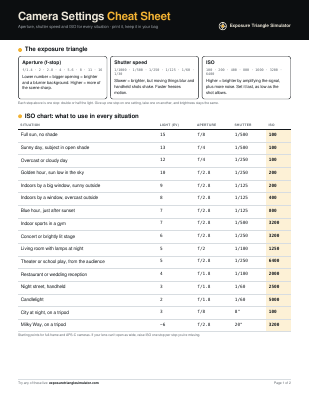
Get the printable camera settings cheat sheet
Two pages to keep in your camera bag: the full ISO chart, settings for 10 common shots, handheld shutter speeds by lens, ND filter times and the five rules worth memorizing.
You’re in.
Your cheat sheet is ready. Print it on letter or A4 paper.
Download the PDFPreview only: nothing was saved, and downloads are blocked in this preview. On the live site, signups appear in your Netlify dashboard under Forms.
Frequently asked questions
What mode do professional photographers use?
Many use Aperture Priority or Manual with Auto ISO for fast-changing situations, and full Manual for studio, landscape and night work.
What does Av mean on a Canon camera?
Aperture value. It is Canon’s name for Aperture Priority mode. Tv (time value) is Shutter Priority.
Is Program mode the same as Auto?
No. In P the camera chooses aperture and shutter speed, but you still control ISO, exposure compensation, focus mode and flash. Full Auto controls everything.
Why is my photo dark in shutter priority?
The camera reached the lens’s widest aperture and couldn’t let in more light. Raise ISO, use a slower shutter speed or add light.