The short version
- Shutter speed is exposure time; each doubling is one stop brighter.
- 1/250 s is a safe everyday handheld speed; 1/1000 s freezes cars and sports.
- Handheld, stay faster than 1/focal length (1/50 s on a 50mm lens).
- Slower than that, use a tripod; only moving subjects will blur.
Last updated · Exposure Triangle Simulator editorial team · How we test
What is shutter speed?
Shutter speed, also called exposure time, is how long the shutter stays open. 1/1000 means one thousandth of a second. 1" or 1s means one full second. Each halving or doubling of the time is one stop of light.
Shutter speed decides what motion looks like. The simulator above has a car at 60 km/h frozen at 1/1000. Slow the shutter down and watch it smear. At night, its headlights draw streaks across the frame.
Shutter speed chart
| Shutter speed | Use it for | Handheld? |
|---|---|---|
| 1/2000 – 1/8000 | Birds in flight, motorsport, splashing water | Yes |
| 1/500 – 1/1000 | Sports, running kids and pets, passing cars | Yes |
| 1/125 – 1/250 | Walking people, everyday handheld photos | Yes |
| 1/30 – 1/60 | Still subjects indoors, wide or stabilized lens | With care |
| 1/15 – 1" | Motion blur, panning, flowing water with an ND filter | Tripod |
| 1" – 30" | Night cityscapes, light trails, stars | Tripod |
| Bulb | Exposures longer than 30 seconds | Tripod + remote |
Camera shake and the 1/focal length rule
Your hands move slightly while the shutter is open. The longer the lens, the more that movement is magnified. The rule of thumb is to use a shutter speed at least as fast as 1 divided by the focal length: 1/50 on a 50mm lens, 1/200 on a 200mm lens. On a crop-sensor camera, multiply the focal length by 1.5 first.
In the simulator, this setup is 1/8 s handheld at blue hour. The whole frame blurs, not only the car. Turn on the tripod and only the moving car stays blurred.
Image stabilization adds 3 to 5 stops of room. It helps with camera shake, not with moving subjects.
How to set shutter speed
- Choose S (Sony, Nikon, Fujifilm) or Tv (Canon) to set the shutter speed while the camera picks the aperture. Choose M to set everything yourself.
- Turn the main command dial. Most cameras step in thirds of a stop: 1/125, 1/160, 1/200, 1/250.
- Check the meter. If the photo is too dark at the speed you need, open the aperture or raise ISO rather than slowing down.
- For slow shutter speeds, use a tripod, turn off stabilization if the lens asks you to, and use the 2-second self-timer so pressing the button doesn't shake the camera.
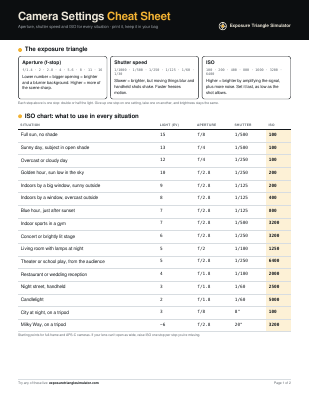
Get the printable camera settings cheat sheet
Two pages to keep in your camera bag: the full ISO chart, settings for 10 common shots, handheld shutter speeds by lens, ND filter times and the five rules worth memorizing.
You’re in.
Your cheat sheet is ready. Print it on letter or A4 paper.
Download the PDFPreview only: nothing was saved, and downloads are blocked in this preview. On the live site, signups appear in your Netlify dashboard under Forms.
Frequently asked questions
What is a good shutter speed for beginners?
1/250 s is a safe everyday handheld speed. Use 1/500 or faster for kids, pets and sports, and 1/1000 or faster for cars and birds.
What shutter speed freezes motion?
Walking people freeze at about 1/250, running people at 1/500, cars and cyclists at 1/1000, and birds in flight at 1/2000 or faster. The closer and faster the subject, the faster the shutter needs to be.
Why are my photos blurry?
If everything is blurry, the shutter was too slow to hold by hand. If only moving things are blurred, the shutter was too slow for the subject. If the subject is soft but something else is sharp, focus was missed.
What does 1/60 mean on a camera?
The shutter stays open for one sixtieth of a second. Some cameras show it simply as 60. A value like 2" means two full seconds.
Does shutter speed affect brightness?
Yes. Doubling the shutter time doubles the light and makes the photo one stop brighter.